Distributed Cloud Bot Defense

Putting Bot Defense in front of a BIG-IP application

What the integration actually asks the BIG-IP to do, the ways to build it, and how to tell which one your customer needs — before you promise any of them.

A field guide for sales engineers Method verified on BIG-IP 17.5.1 or Next to move through it
The product

Three components, wherever you deploy it

This part does not change between a Distributed Cloud deployment, a CDN deployment and a BIG-IP one. Only the third bullet on the middle box — who enforces — is what the rest of this deck is about.

1 Client JavaScript & Mobile SDK Runs in the browser or the app. Collects signals. Decides nothing. Delivered by the enforcement point. 2 Policies + engine Bot Defense policy & engine Scores the telemetry, returns a verdict, marks what it has already inspected. Cloud service, or on-premise. 3 Reporting Metrics & dashboards What was blocked, what got through, and the trend the customer will ask for. In the XC console. The BIG-IP's job is to deliver component 1 and to reach component 2. It never scores anything itself.
The picture you have already presented

Bot Defense, end to end

Web browser / app Bot Defense JS or SDK transparently generates security & fraud telemetry POST /login Internet Protected app flows XC BIG-IP CDN The enforcement point. It serves the script and steers protected requests. Origin servers Your application reached only by what survived the verdict human traffic + accepted automation monitoring tools, partners, the good bots F5 Bot Defense engine cloud or on-premise Stage I analysis real-time, in the request path Stage II analysis correlation, after the fact Analyses telemetry, hashes sensitive data, adds custom HTTP headers, and stops unwanted transactions in real time. 1 2 Unwanted automation Stopped at the engine. It never reaches your application at all. 24/7 F5 threat management centre Human inspection, machine learning and AI — the policy improves without you touching the BIG-IP.

1 the enforcement point sends a protected request down for inspection  ·  2 what is allowed comes back, marked as already inspected. Those two arrows are the entire BIG-IP integration. Everything else on this slide is F5's side of it.

The JavaScript and Mobile SDK client

Zero trust, applied to the device

Worth being able to explain, because it is the first thing a security architect will push on: why not just read the headers?

Trust nothing the device claims

A User-Agent is a string an attacker sets. So are the rest of them. Self-declared identity is evidence of nothing.

No decision logic in the client

Anything shipped to the device can be read and rewritten. The client gathers; the engine decides.

Hundreds of signals per transaction

Gathered and transmitted securely, with sensitive values hashed before they leave.

Tamper and reverse-engineering detection

Checksums and integrity checks, so a modified client is itself a signal rather than a blind spot.

What a request tells you on its own
Accept: */*
Accept-Encoding: gzip, deflate, br
Accept-Language: en-US,en;q=0.9
Cache-Control: no-cache
Connection: keep-alive
DNT: 1
Host: www.example.com
Pragma: no-cache
Sec-Fetch-Dest: document
Sec-Fetch-Mode: navigate
Sec-Fetch-Site: none
Upgrade-Insecure-Requests: 1
User-Agent: Mozilla/5.0 …

Every line of that is attacker-controlled. Which is the whole argument for putting a telemetry client on the page — and the reason one of the BIG-IP's three jobs is delivering it.

Part two

What that asks
of the BIG-IP

Strip away the implementation and there are three jobs. Two of them turn out not to need code at all.

The whole integration

Three jobs. That is the entire brief.

1

Send protected requests to the service

In reverse-proxy mode, Bot Defense is a service the BIG-IP steers traffic into. Login, checkout, whatever the policy protects — those requests go there first instead of straight to the application.

a routing decision

2

Put the telemetry script on the pages that need it

The pages where a user starts a session get a <script> tag injected into the HTML. That is what collects the signals the service scores.

content, not routing

3

Recognise the traffic coming back

Bot Defense inspects a request and hands it back to the same virtual server. The BIG-IP has to know this one has already been inspected and send it on to the application, instead of round-tripping it forever.

a routing decision

Nothing here is Bot Defense-specific to a BIG-IP admin. Two of the three jobs are the question which pool does this request go to, asked twice. The third is putting a tag in a page.
One virtual server

The round trip, on a whiteboard

This is the picture to draw when the customer's network team asks what changes. It is worth a minute — every design decision later comes back to the fact that the request leaves and returns on the same virtual server.

Client Browser with the telemetry script POST /login BIG-IP — one virtual server LTM policy first match Is this path protected? Has it already been inspected? HTML profile + short iRule Adds the script tag to entrypoint pages only. Never selects a pool. XC Bot Defense Telemetry, signals, verdict reached as an ordinary pool Application pool Your origin servers the virtual server's default pool Blocked Unwanted automation never comes back. 1 2 3 script added to the page
  • 1Protected — send it for inspection. First leg. If the service is unreachable, straight to the application instead.
  • 2It comes back, marked. Second leg. Same virtual server, carrying a header the engine added.
  • 3Recognised — stop evaluating. The policy takes no action, so the request falls through to the default pool.
The observation this deck turns on

Two of the three jobs are routing.
Routing is what an LTM policy is for.

Jobs 1 and 3 — configuration

Which pool does this request go to? Asked once on the way out and once on the way back. That is the same object the customer's admins already use for host-based steering and URI rewrites.

It is a first-match policy with a handful of rules, and the paths it matches live in data groups — records in a list, not decisions buried in code.

Job 2 — a small iRule

Only putting the script on a page needs an iRule at all, and that piece never decides where traffic goes. It flags an entrypoint, turns the HTML profile on for that response, and gets out of the way.

Which is a very different kind of object to hand a customer than one that owns pool selection.

So why does the F5 iRule exist? Because it also handles mobile SDK traffic, interstitial mode, SNAT, persistence, true-client-IP insertion and several applications behind one virtual server. Take those away — and for most web deployments you can — and what is left fits in configuration. The next part is about deciding which deployment you are looking at.
Part three

Three ways to
build it

All three are supported. All three work. They are not competing — they cover different amounts of ground, and picking the wrong one is expensive in opposite directions.

Option A

An LTM policy and a small iRule

For a web-only deployment where Bot Defense returns traffic to the virtual server directly — which is most of them — the same three jobs are configuration. Same traffic flow, same service, different objects.

The policy does the steering

0telemetry script path→ bot pool
1header and egress addressno action
2GET  path ends-with→ bot pool
3POST path equals→ bot pool

First match wins, so the order is the logic. Rule 1 is how already-inspected traffic is recognised; taking no action lets it fall through to the default pool.

The paths live in data groups

One list per method-and-operator combination, filled from the endpoint list in the XC console. Adding a protected endpoint later is a record in a list — not a code change.

The iRule does the injection, and nothing else

Flags a request as an entrypoint, disables the HTML profile on every response that is not one, and turns off server-side SSL when the service leg is not on 443.

It never selects a pool. That is the property that makes it safe to hand over — it cannot silently override the policy, because it has no opinion about where traffic goes.

Plus the ordinary furniture

A pool and health monitor for the Bot Defense service, an HTML profile carrying the <script> tag, and a OneConnect profile. Objects a BIG-IP admin creates every week.

Option B

The F5 iRule

F5-authored, F5-maintained, and the reference implementation. It is a pair of iRules — a configuration rule you edit and a base rule you do not — and it is the right answer whenever the deployment needs any of the things below.

Mobile SDK traffic

Mobile endpoints as well as web, handled by header rather than path.

Interstitial mode

The challenge-page flow, end to end.

SNAT on the service leg

Evaluates SNAT per connection and can restore the real client address.

Persistence

Inserts its own cookie so application persistence cannot override the pool it picked.

True-client-IP

Inserts the client address on the way out and strips it on the way back.

Several apps, one VS

Multiple applications with different policies behind a single virtual server.

Double-evaluation control

Turns ASM and Bot Defense off on the second leg so nothing is scored twice.

Graceful degradation

Answers the telemetry script itself when the service pool is down, so the page still loads.

None of that is overhead — it is coverage. The F5 iRule is large because the problem it solves is large. If the deployment in front of you needs one of these eight, this is the option — take it, and bring an engineer who has run it before.
Option C

The iApp connector — API Mode

To come. This section is reserved.
Option A and Option B, side by side

What the customer inherits

Option A — policy + small iRule
LTM policyfirst match
  • four rules, readable as a table in the Configuration utility
  • the order is the logic, and it is on screen
Data groupsrecords
  • the protected paths, one list per method and operator
  • the service's egress addresses
  • the telemetry script path
iRule33 lines
  • request: is this an entrypoint?
  • server connected: server-side SSL off when the leg is not 443
  • response: HTML profile off, on again if flagged
  • does not steer
HTML profile + rule1 tag
  • carries the <script> tag itself
Option B — the F5 iRule
Configuration rule125 lines
  • the virtual server's own name, set by hand
  • pool name and three data-group names
  • telemetry header prefix from the console
  • SNAT command · persistence command
  • true-client-IP header and layer
  • debug level · web / mobile / interstitial
  • must exist, must not be attached to the VS
Base rule196 lines
  • connection setup: ID, SNAT and persistence evaluation, app selection
  • request: client-IP extraction, web/mobile detection, second-leg detection, entrypoint and endpoint flagging, spoofed-header stripping
  • request again, later: pool, SNAT, persistence, XFF
  • response: HTML on/off, interstitial handling

You are not meant to read either column. That is the point — one of them, somebody has to. The question is not which is shorter; it is which one the customer's admin can still explain after you have left.

Be straight about this on the call

What Option A does not do

The F5 iRule exists because these cases exist. If the deployment needs any one of them, that is the answer — and saying so early is cheaper than discovering it in a change window.

CaseWhere Option A stops
SNAT on the service legThe design recognises returned traffic by its source address. A SNAT in between breaks that. The F5 iRule evaluates SNAT per connection and can restore the client IP.
True-client-IP headerThe F5 iRule inserts a configurable client-address header outbound and strips it inbound. Option A does not need to — it preserves the client address instead — but it also cannot provide the header.
PersistenceThe F5 iRule inserts its own cookie so application persistence cannot override its pool selection.
Mobile SDK trafficNot covered. Mobile endpoints are reported and skipped.
Interstitial modeNot covered.
Double evaluationThe F5 iRule disables ASM and Bot Defense on the second leg. Option A does not.
Script when the pool is downThe F5 iRule answers 200 with no-cache so the page still loads. Option A's script rule has no fallback pool.
path_and / path_noneNo single-rule policy equivalent. Reported and skipped, by name.
An existing pool-selecting iRuleIt silently wins over the policy for the requests it touches. Use Option B.
Take these into the discovery call

Four questions that decide it

Ask all four before you commit to an approach. Any yes and Option A is the wrong tool — bring an engineer, and say so on the call rather than in the change window.

1 Is there a mobile app using the Bot Defense SDK? Option A covers web only.
2 Do they need interstitial mode? Not covered.
3 Does the virtual server already have an iRule that selects a pool? It would silently override the policy. Stop.
4 Is one virtual server fronting two applications with different policies? Option B handles that; Option A does not.
All four no? Then you are in the common case, and the rest of this deck is the build.
Part four

Configuring it

What the network looks like, what you create, and what the screens actually say. From here on it is the build.

Inline · load-balance based

Where everything sits

CLIENT Browser with the telemetry script on the page www.example.com FIREWALL Static NAT 203.0.113.10 → 172.16.10.3 Inbound allow tcp/443 BIG-IP Virtual server 172.16.10.3:443 Internal self-IP 10.1.1.1 policy · iRule · HTML profile 3 APPLICATION Origin servers 10.1.1.20 10.1.1.21 the VS default pool PROTECTED Entrypoint — gets the script GET /login Endpoint — gets inspected POST /authentication from the XC console 1 protected request sent out for inspection 2 comes back carrying shape-header from an egress address below F5 BOT DEFENSE SERVICE reached over the internet as an ordinary pool member Inbound — you send to bot-defense.example.net:443 an FQDN pool member, so the addresses can change under you Outbound — it returns from 198.51.100.4 198.51.100.5 the egress list the policy matches on the service leg leaves through the same firewall on the way out — outbound NAT Addresses are examples only RFC 5737 documentation ranges throughout — substitute the customer’s own

Two addresses do all the work. You send to the service by name, and you recognise what comes back by the address it came from — which is why a SNAT anywhere on that return leg breaks the design. Trace that path before you commit to the approach — it is the one limit you cannot see from the BIG-IP configuration.

The object inventory

Six objects, and two you check first

Check the virtual server has these two before anything else. An HTTP profile — without one the box parses no HTTP at all, an HTML profile is refused outright, and neither the policy's path conditions nor the injection can work. And a OneConnect profile, so the two legs are not pinned to one server-side connection. Stock /Common/http and a plain OneConnect are fine.
1

Pool + health monitor

One pool for the Bot Defense service, member by FQDN on 443, with a monitor so the box knows when it is unreachable.

2

Data groups

The protected paths — one list per method and match operator — plus the service's egress addresses and the telemetry script path.

3

LTM policy

First match. One rule for the script path, one that recognises returned traffic, and one per method-and-operator pair.

4

iRule

Entrypoint flag, HTML profile on and off, server-side SSL off when the service leg is not 443. No pool selection.

5

HTML profile + rule

Appends the <script> tag to the head of entrypoint responses. This is the only object that edits the page.

6

The attachment

Policy, iRule, HTML profile and OneConnect on the virtual server. The one step that touches production — and the one you undo first.

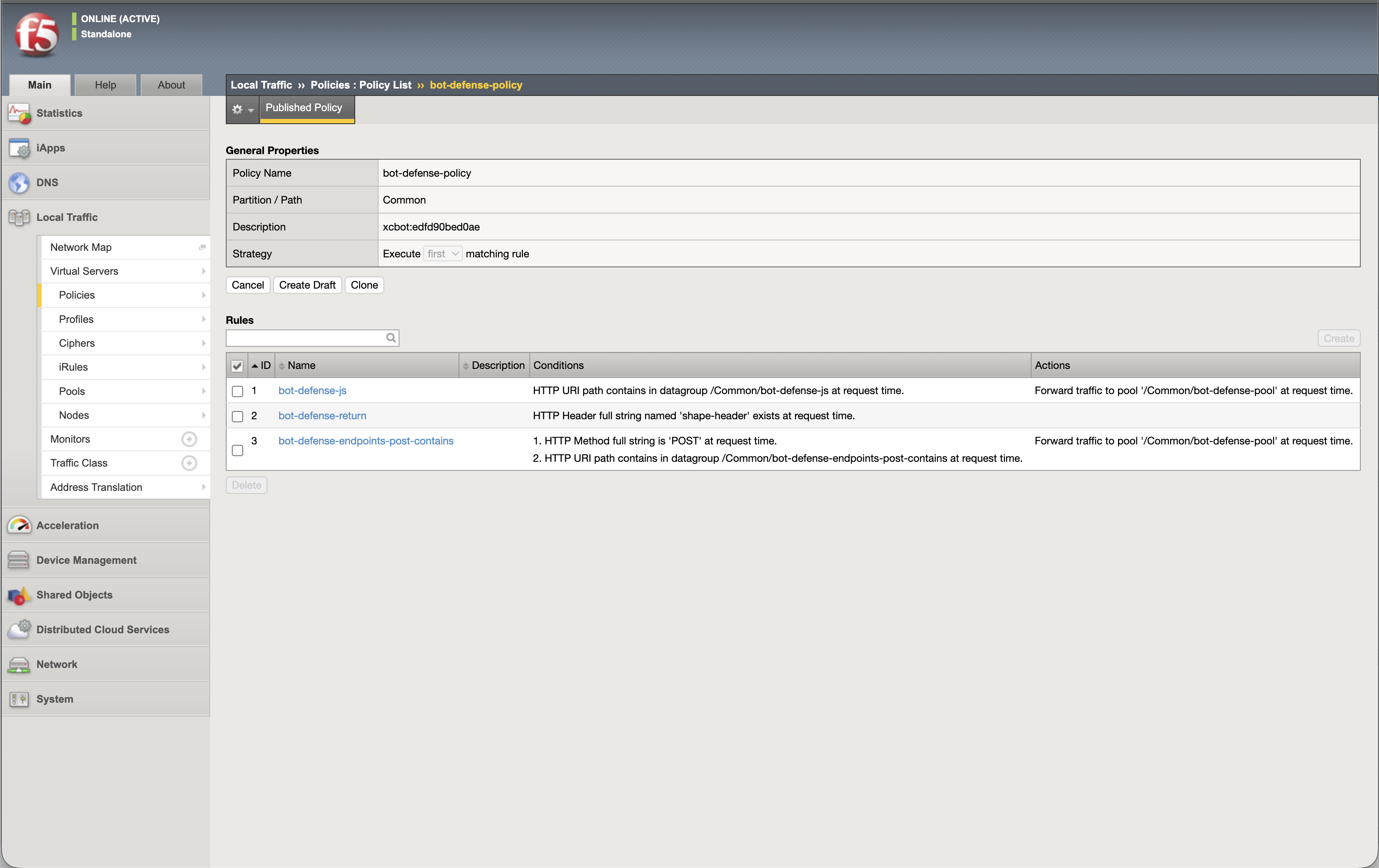
Local Traffic ›› Policies

The whole decision, on one screen

The BIG-IP policy rule list: strategy set to first match, with
                    rules for the script path, the return leg and the protected
                    endpoints.
  • A
    Execute first matching rule The order is the logic. Read top to bottom and you have read the deployment.
  • B
    The script path, first The telemetry request goes to the service before anything else can claim it.
  • C
    Then the rule with no action shape-header exists and the source address is in the egress list. Both halves are required — the header alone is client-settable. Matching, the rule does nothing, and the request falls through to the application.
  • D
    Then the protected endpoints One rule per method and match operator, each reading its paths from a data group.

A CDN in front of the BIG-IP does not break this. Client traffic arriving with the real address in X-Forwarded-For is fine — rule C is about the return leg, and that leg comes straight from the service. If it cannot, the fix is on the XC side, not here.

Data groups, and the HTML rule

Where the paths live, and where the tag comes from
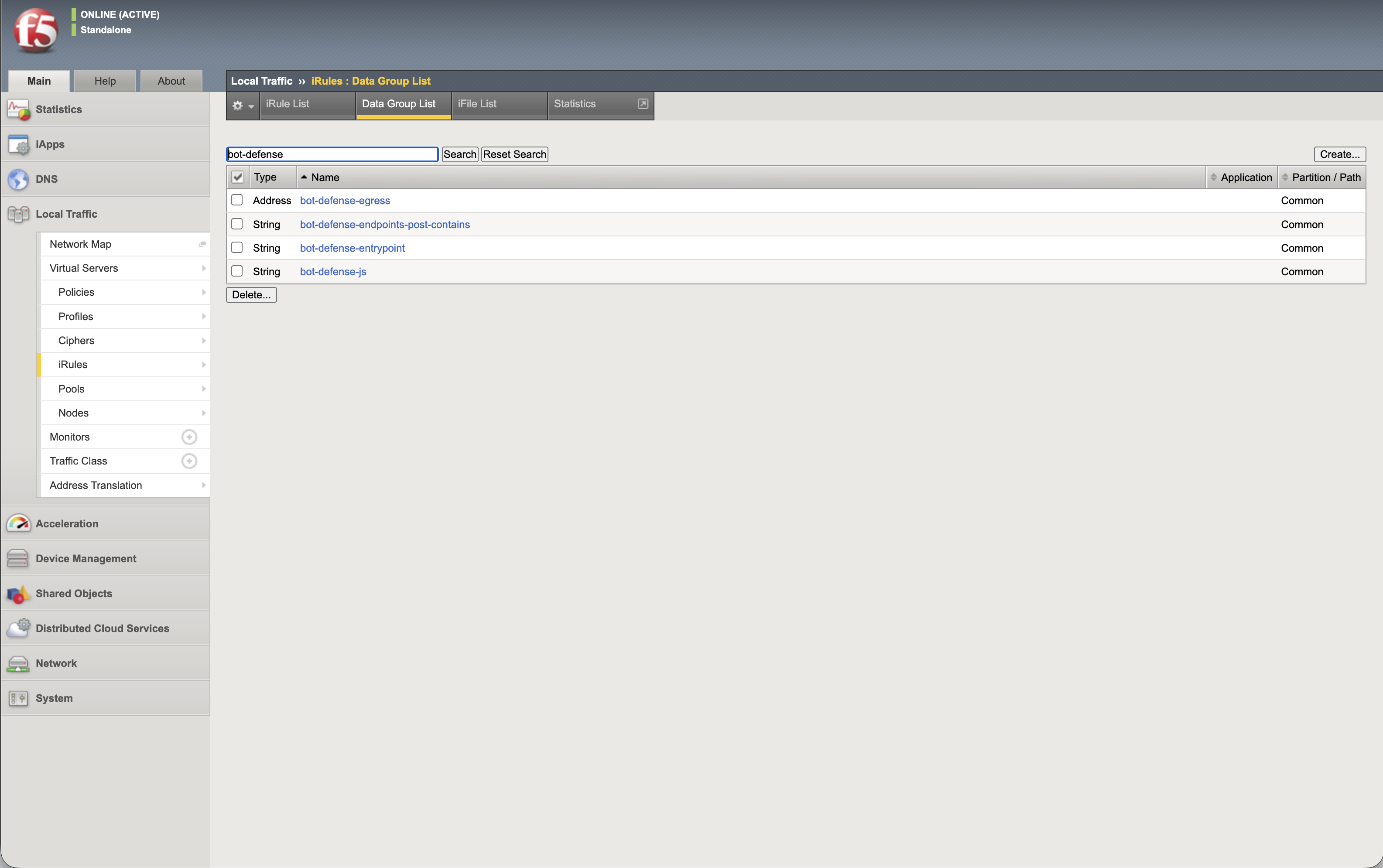
The BIG-IP data group list showing one list per method and
                    match operator, plus the egress address list.
One list per method and operator. Adding a protected endpoint six months from now is a new record here — no policy edit, no iRule edit, no change window for code.
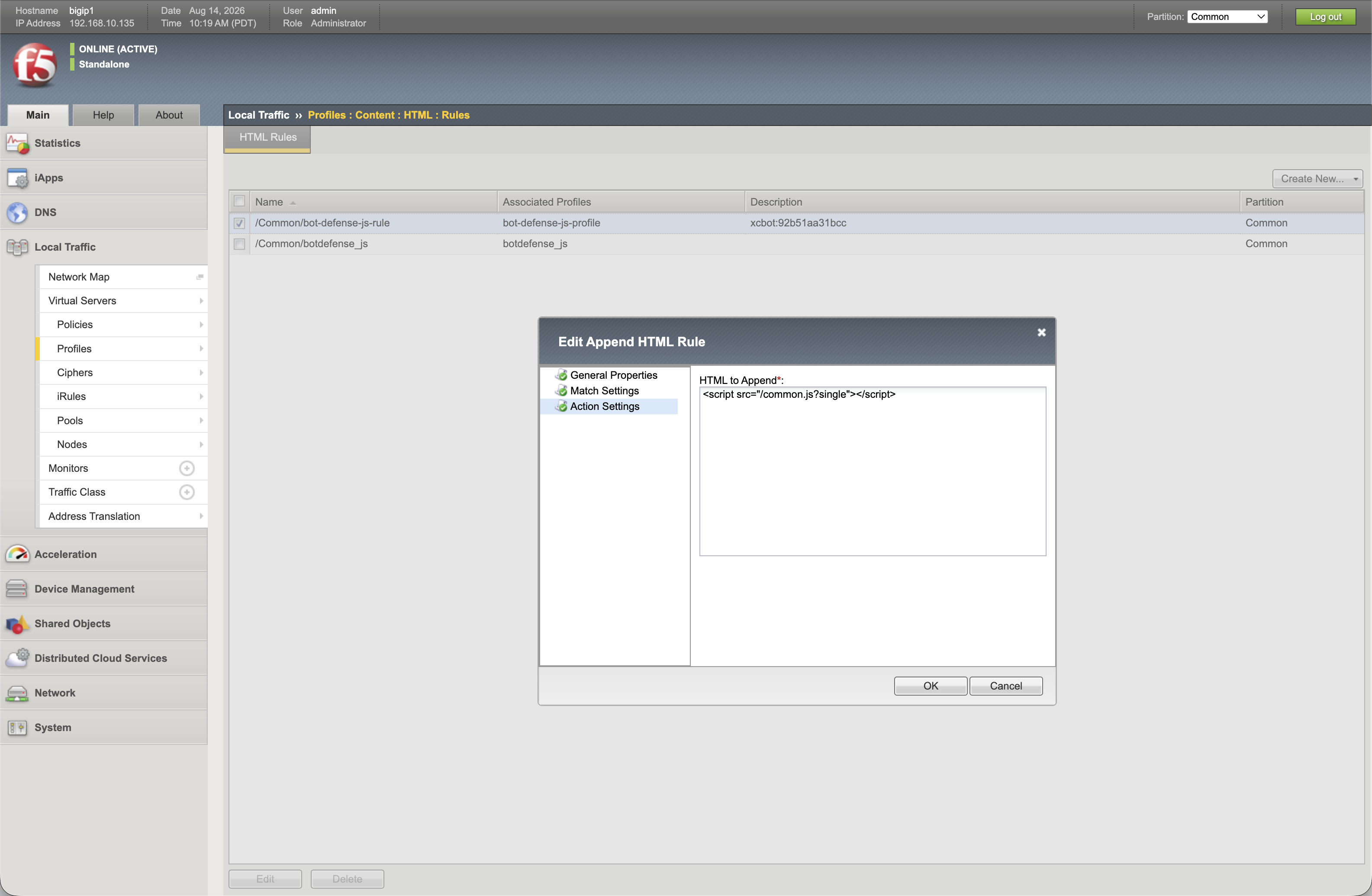
The BIG-IP HTML rule that appends the telemetry script tag to
                    the head of the response.
The HTML rule appends the tag to <head>. The script source comes from the XC console, and this is the only place the page is modified.
The only step that touches production

Attaching it — and undoing it

Everything so far was new objects, invisible to traffic. These two tabs are the change, and they are also the rollback: detach, and the virtual server is exactly what it was.
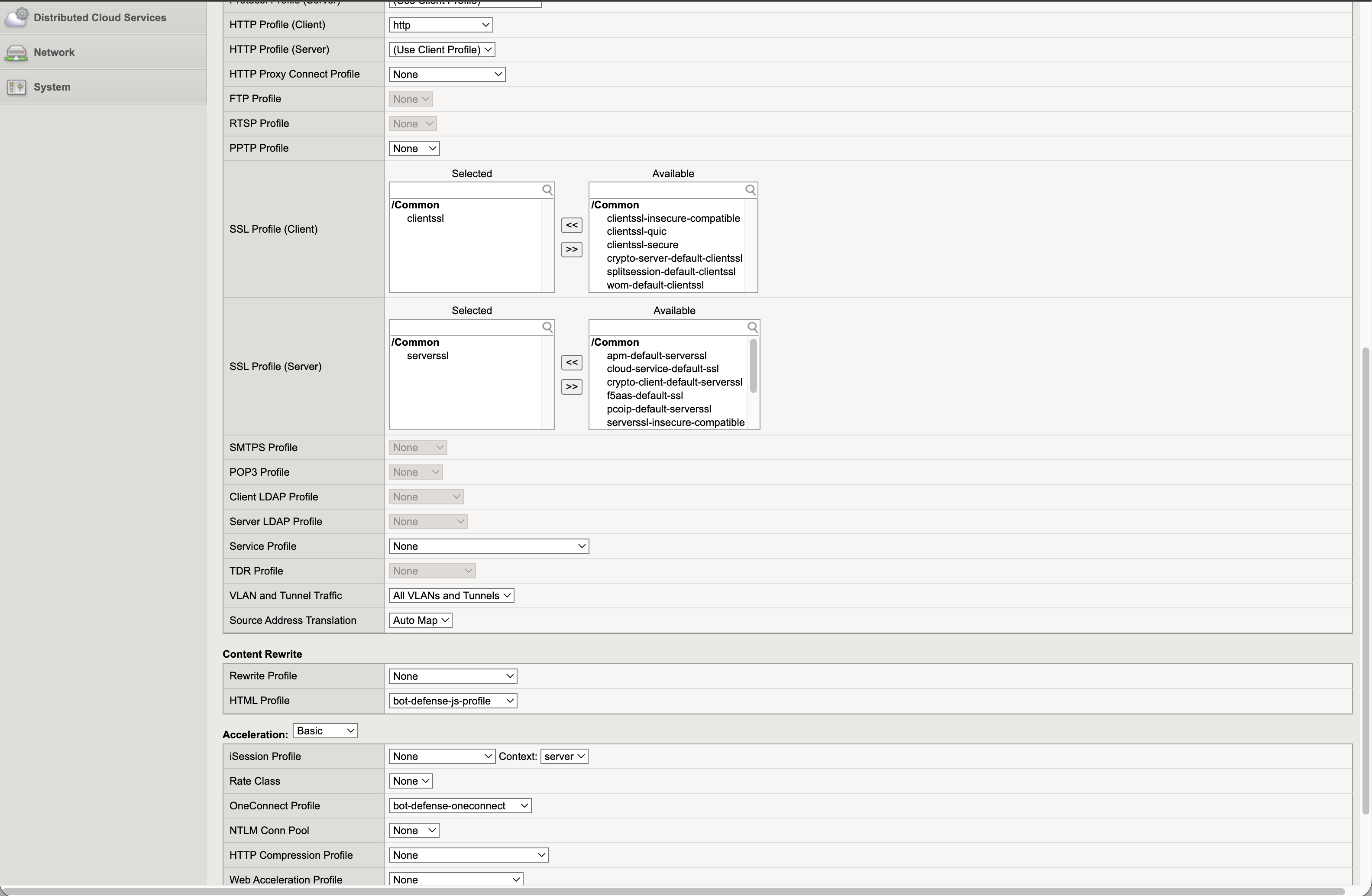
The virtual server Properties tab showing the HTTP, HTML and
                    OneConnect profiles attached.
Properties — the HTTP profile that has to be there already, the HTML profile carrying the tag, and OneConnect.
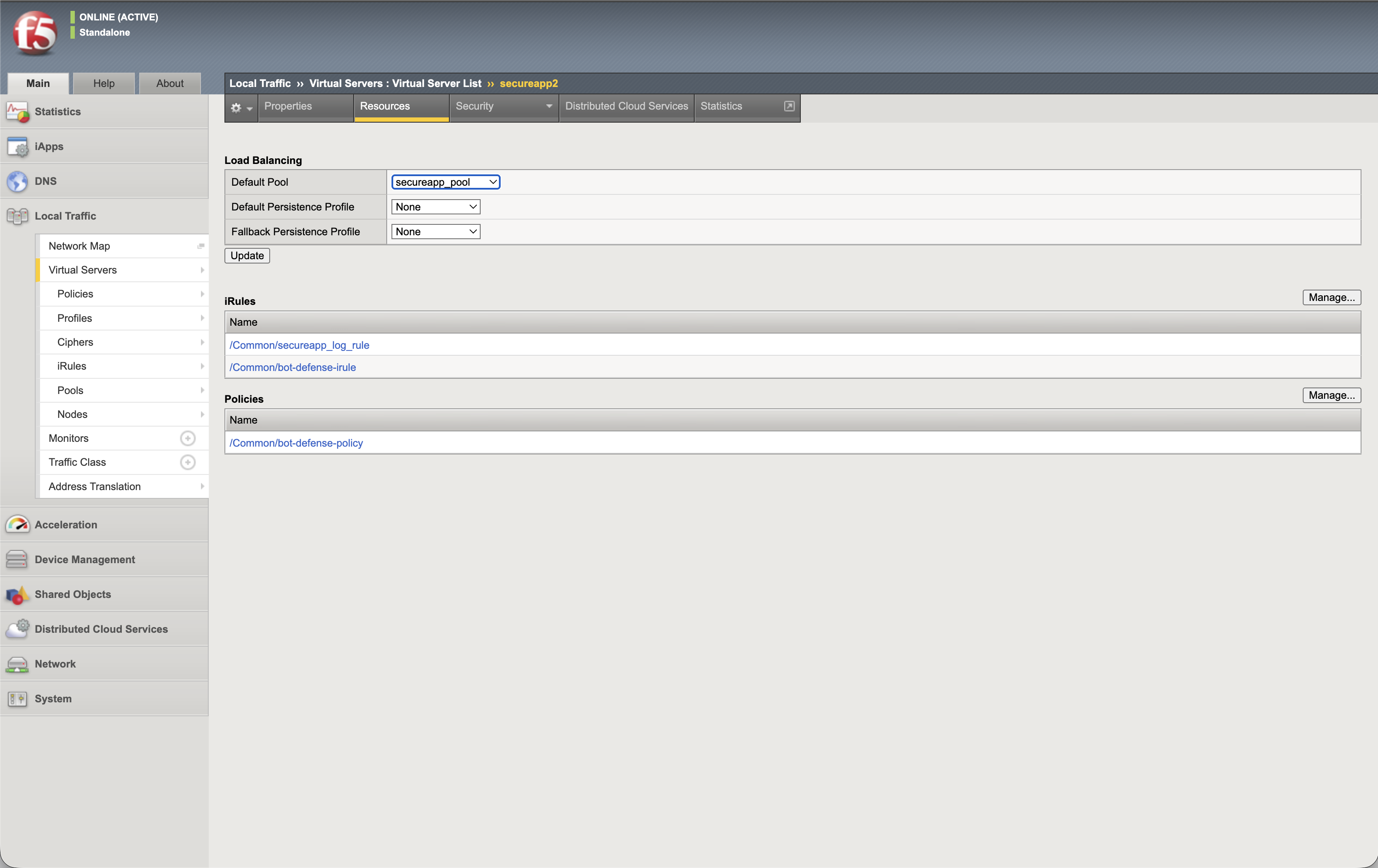
The virtual server Resources tab showing the default pool, the
                    attached policy and the single iRule.
Resources — the default pool unchanged, the policy attached, and the Bot Defense iRule sitting alongside a logging rule the application already had. That second rule is exactly what question 3 was about: it is fine here because it logs, and it would not be if it picked a pool.
What the 33 lines actually are

Worth opening once, on your own, before you present. It is short enough to read in a change window, and the thing to notice is what is not in it: no pool command, no snat, no persistence, no conditional steering. It flags an entrypoint, turns the HTML profile off and back on, and drops server-side SSL when the service leg is not 443.
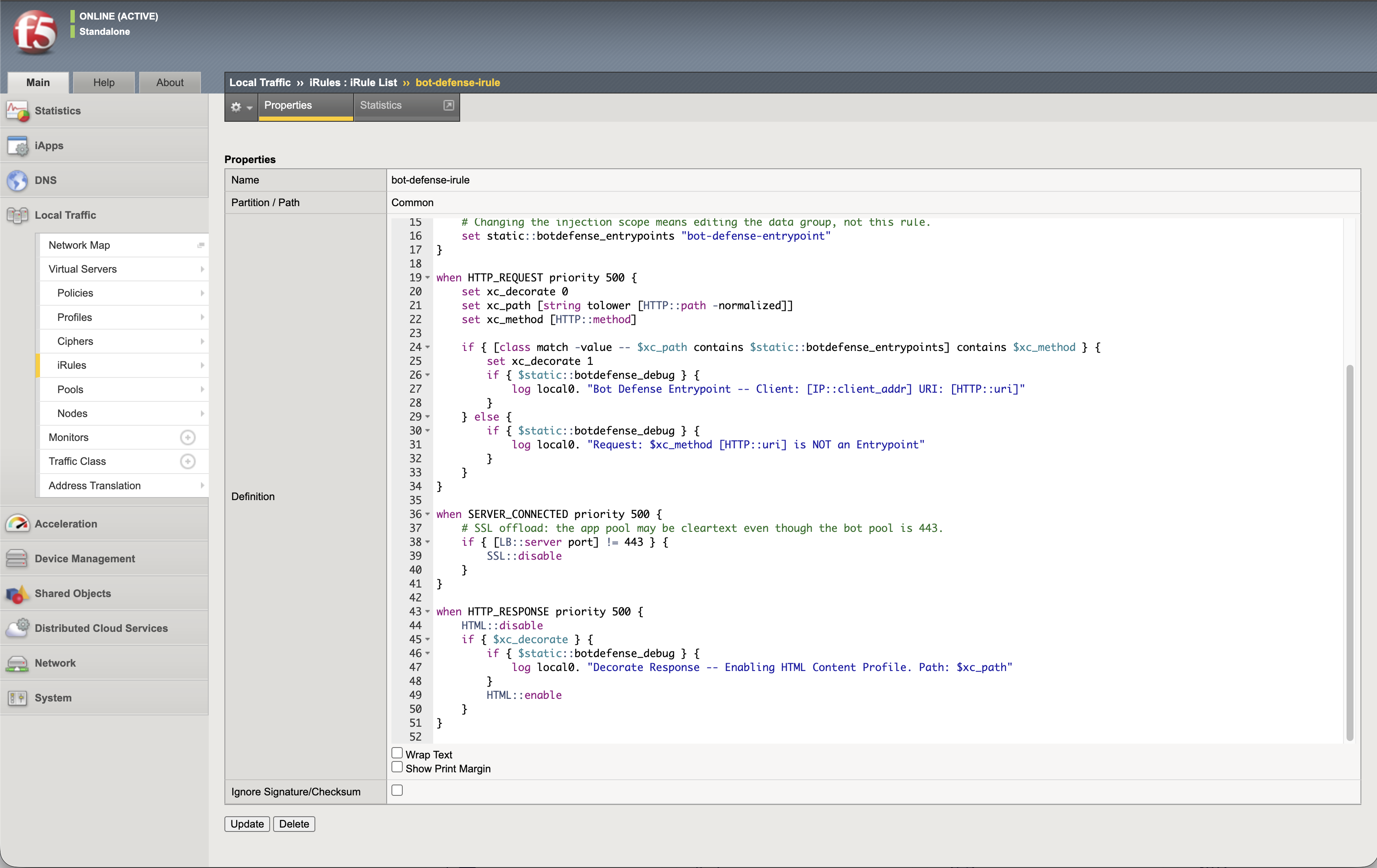
The iRule body in the BIG-IP configuration utility.
The last thing to say on the call

Six months later

What you deploy is a snapshot

The protected endpoint list in the XC console is owned by the security team, and it moves. A new login flow ships, a path is renamed, an API version is added — and the BIG-IP does not know.

This is true of both options. The difference is what the fix costs.

With Option A the fix is a record

A new protected path is a record in a data group. Somebody who has never seen the deployment can add it, in the Configuration utility, without reading a line of TCL and without a code review.

Optional: keep it in step automatically

If the customer would rather not do that by hand, the toolset that accompanies this deck reads the endpoint list from the XC API and writes the same objects — and, more usefully, tells you when the box has drifted from the console.

$ python3 xcbot.py sync --check --vs secureapp CHANGES TO APPLY -- data-group records only (2) + /api/v2/checkout - /api/v1/checkout Staged: 2 Apply: rerun without --check

It is a convenience, not the method. Nothing on the previous six slides depends on it — if the customer never runs it, the deployment is still complete and still explainable.

That is the whole integration. Three jobs, six objects, two tabs on the virtual server, and four questions that tell you whether this is the right shape for the customer in front of you. If all four came back no, you have everything you need to build it.